
Reviewing a source chemical identity
Source:vignettes/articles/source-identity-review.Rmd
source-identity-review.RmdA lookup hit tells you which registry identity a search found. Acceptance records your decision that an identity represents a particular source entry. The name and CAS lookups can agree while that source still needs review.
This guide shows the current full app using synthetic inventories and
mocked registry services. The names, IDs and acceptance shown here
demonstrate the workflow; they are not validated chemical assignments.
Click a screenshot to open its full-size image. To follow along from a
checkout, see
inst/examples/identity-review-app-README.md.
Tell CONCERT which IDs came from your source
Upload your CSV or XLSX, then open Tag Columns. Tag the chemical name as Chemical Name, CAS numbers as CASRN, and a supplied DTXSID as Source DTXSID. Click Apply Tags. Untagged source context, such as the inventory filename, remains in the data.
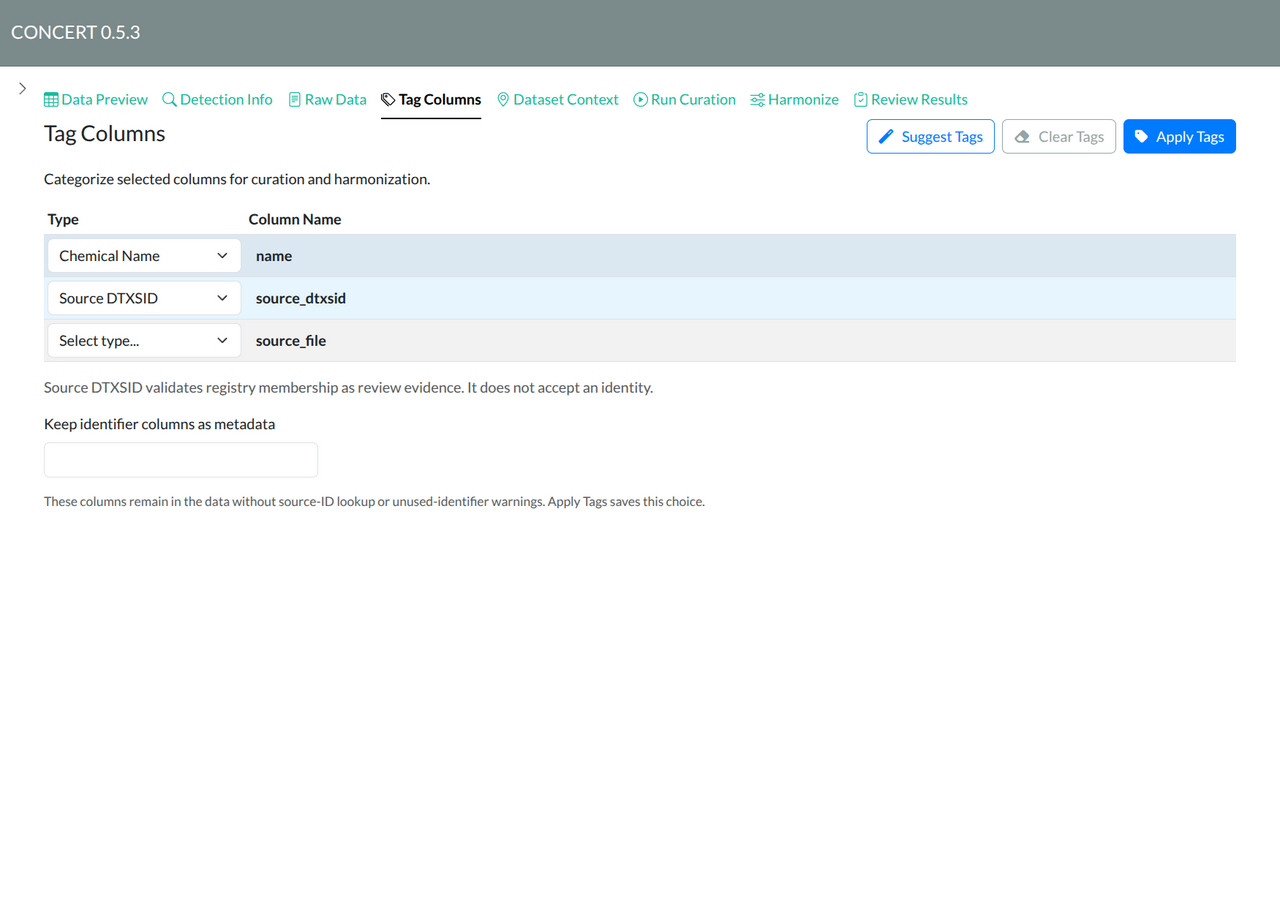
The Source DTXSID role checks registry membership and keeps the
response as evidence. It does not accept that ID as the identity of the
source entry. A raw column named dtxsid or
dtxsid_* does not gain that role from its name alone. If an
identifier is only metadata, deliberately choose Keep identifier
columns as metadata and apply the tags to save that choice.
With both Name and CASRN tagged, Clean Data appears before Run Curation. Run the checked cleaning steps, then start curation. With a chemical name, CASRN, or source DTXSID but without that pair, proceed directly to Run Curation. Source row lineage is retained in either path.
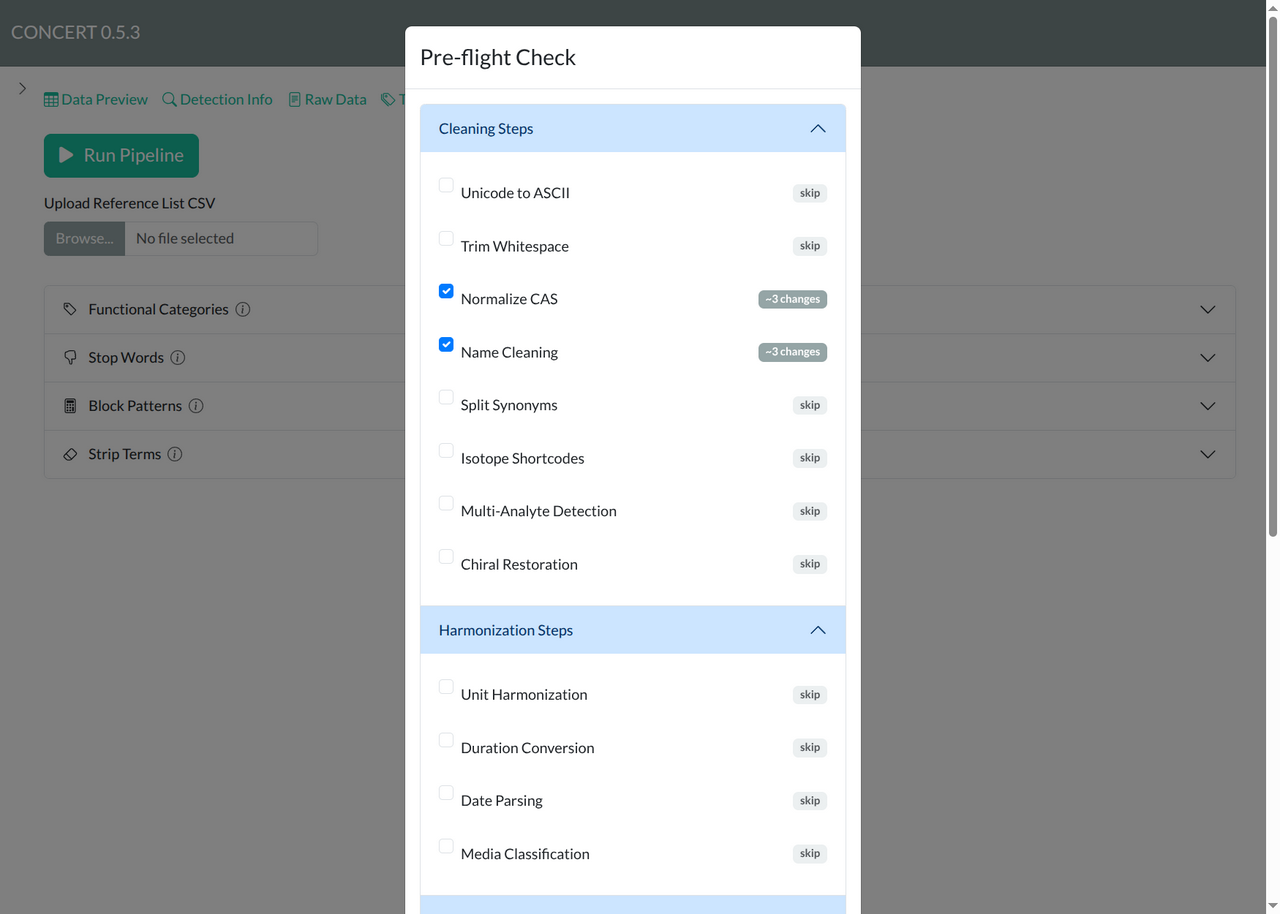
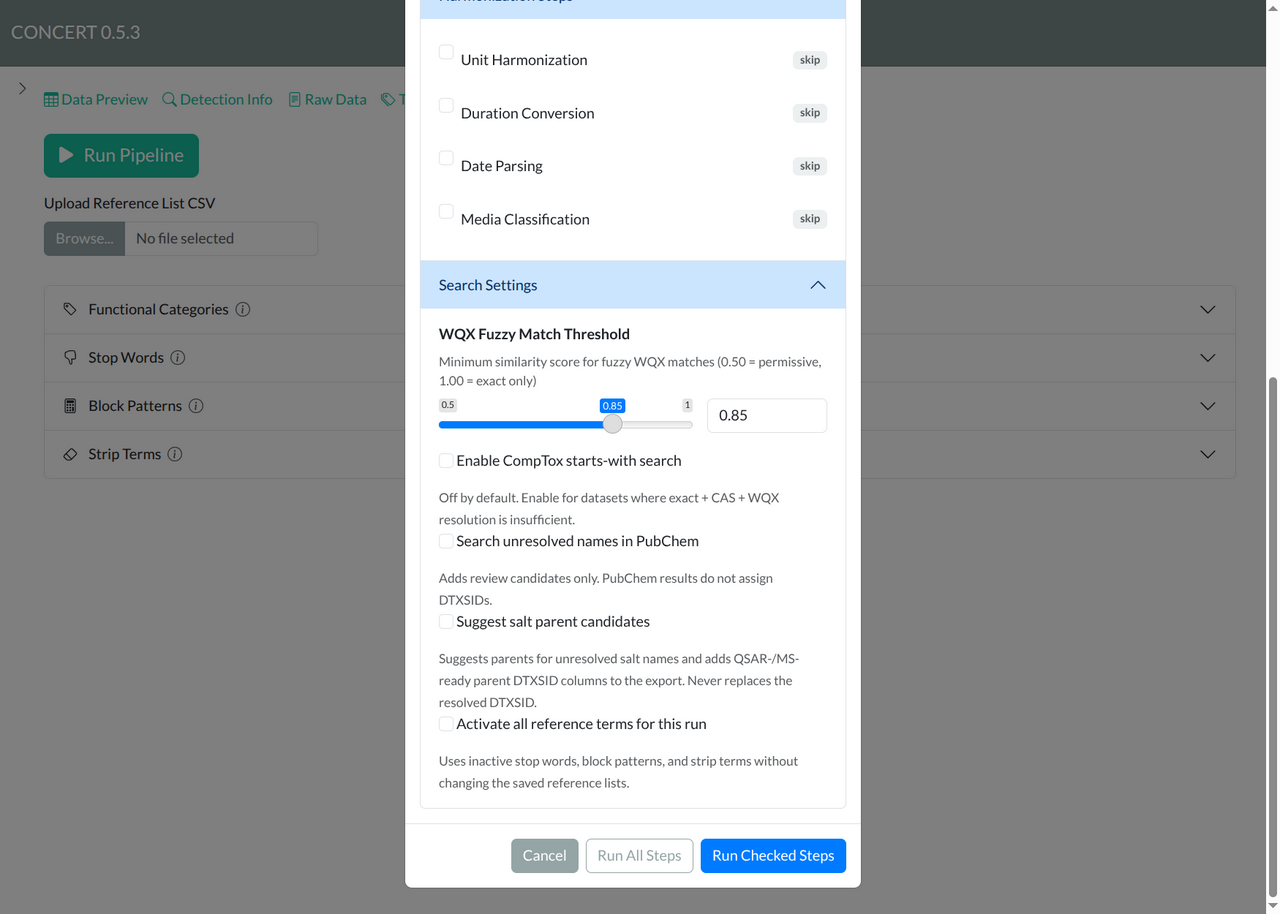
If you use Clean Data, the pre-flight dialog shows cleaning and harmonization steps plus optional search settings. Run Checked Steps applies your selected steps; Run All Steps applies every step. Review the search settings before running: PubChem and salt-parent results add candidate evidence rather than automatically accepting an identity. The applied cleaning choices are saved for later replay. These two overlapping views show the entire current pre-flight dialog, including its search settings and run/cancel buttons.
Read the lookup result and the source decision separately
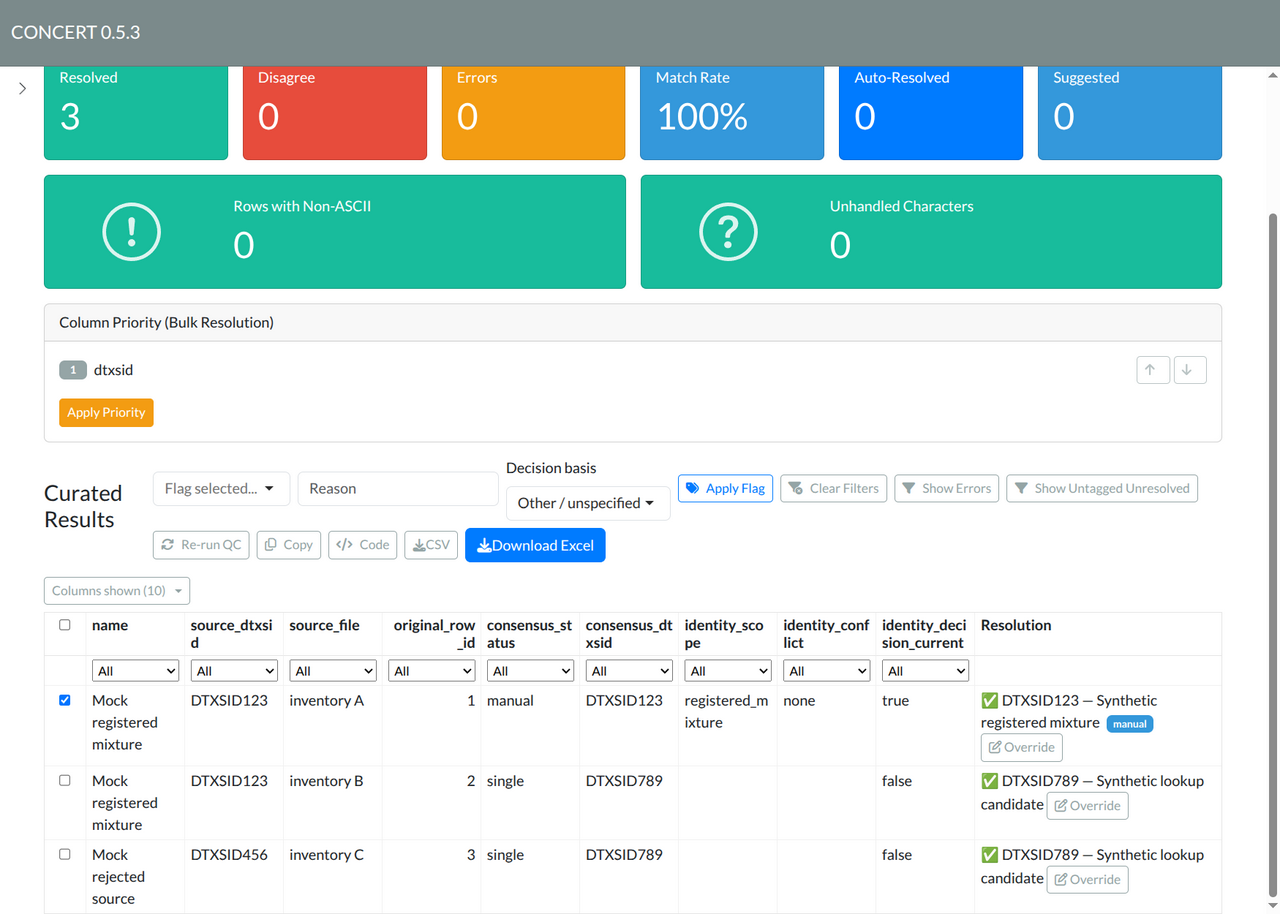
Open Review Results. The Resolved
and Match Rate cards describe lookup consensus. A green
checkmark or single/agree status is not proof
of accepted source identity. Open Override to inspect
its current Identity status and blockers. Use
Columns shown to include the source filename, original
row ID, scope and decision status when comparing rows.
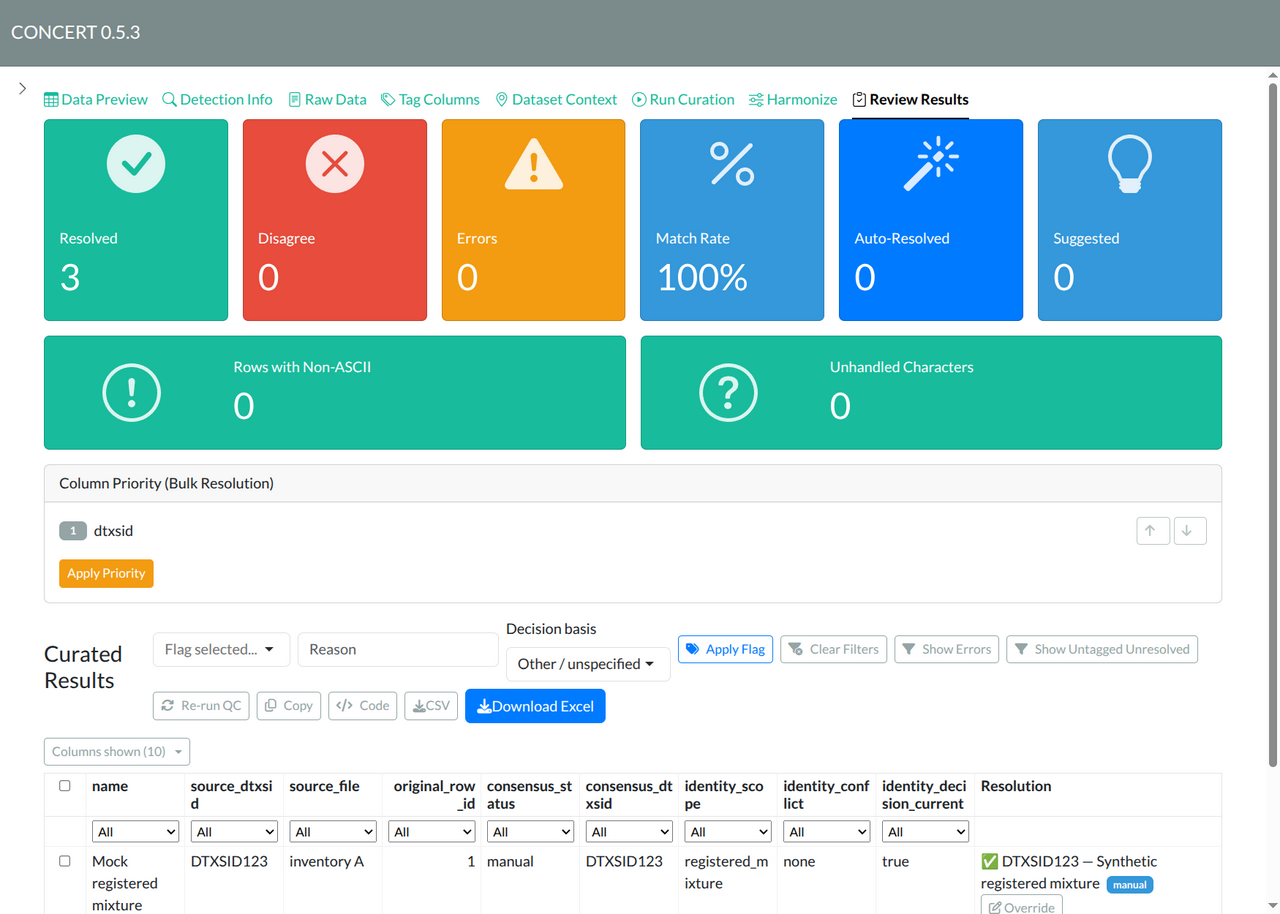
In this example, inventories A and B share a name and a supplied
DTXSID. Only inventory A has an accepted source decision. Inventory B
keeps its provisional lookup result. The third source has a definitive
missing registry record for its supplied ID. An unavailable service
response would instead be shown as unavailable; it is not a
definitive rejection.
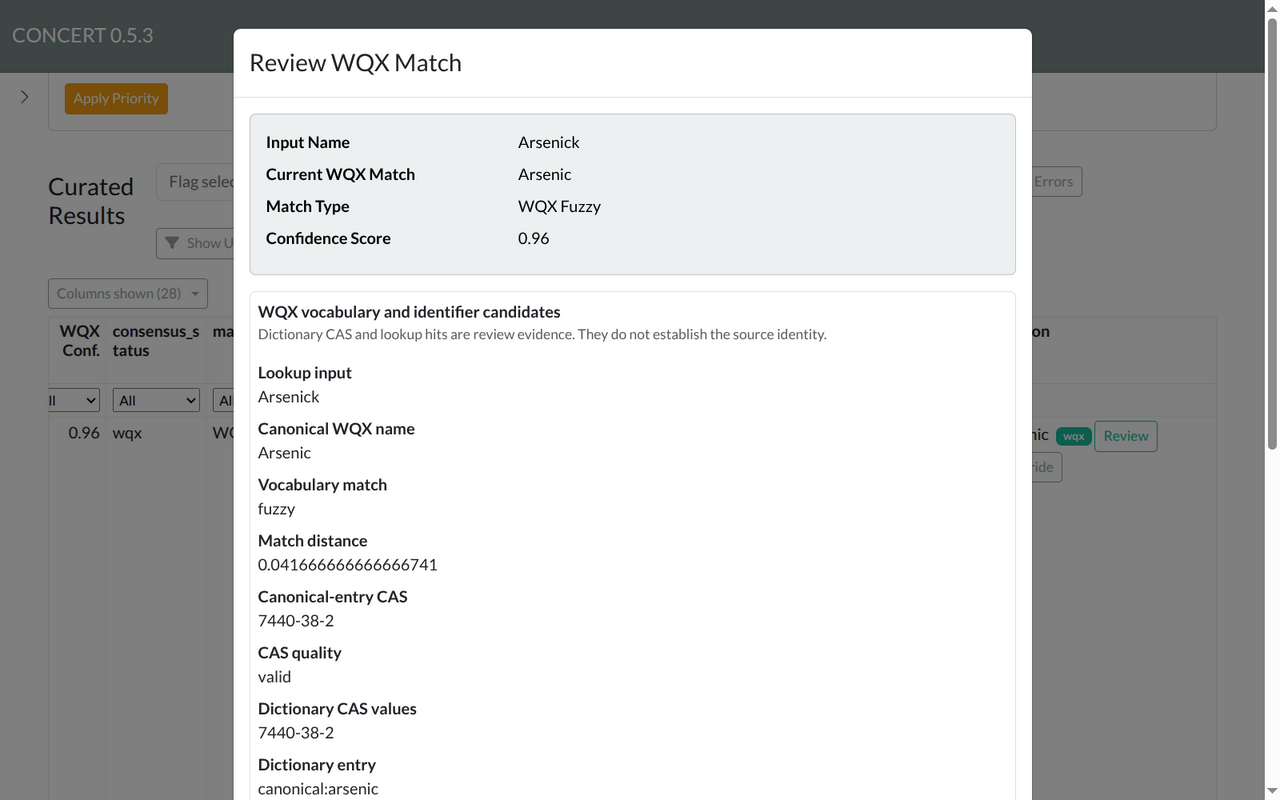
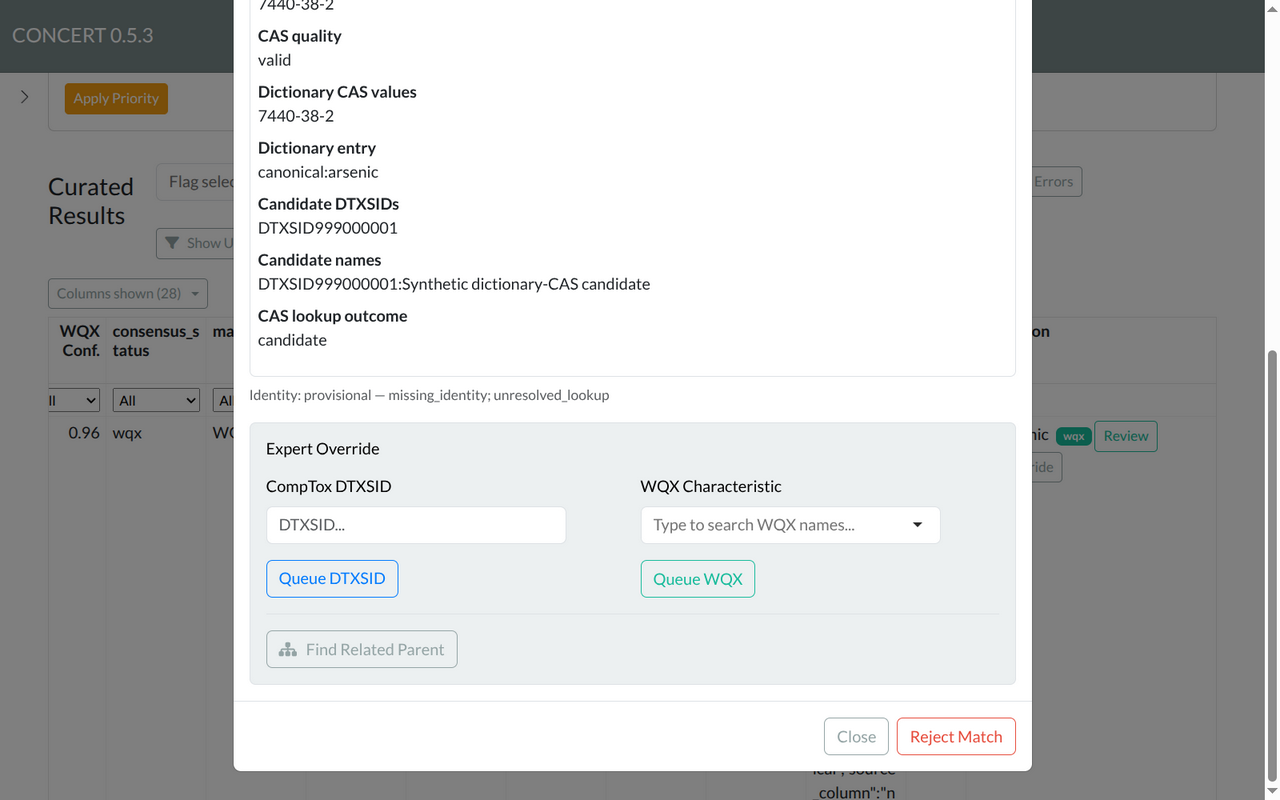
A WQX vocabulary match may have a canonical dictionary CAS without
identifying your source chemical. CONCERT now looks up that CAS and
continues candidate searches using the original and canonical names.
Override shows the canonical entry, CAS quality, lookup
outcome and candidate IDs in WQX vocabulary and identifier
candidates. Those hits remain provisional, including fuzzy
matches from a class name to one substance. Review source correspondence
before accepting an ID; a vocabulary-only VERIFIED decision may
legitimately retain no DTXSID. Unreviewed WQX rows also appear in
headless pending.csv, even when no CAS or candidate is
available. FOLLOW-UP and BAD retain their explicit dispositions.
For WQX rows, Review opens the vocabulary match and its candidate evidence. These two overlapping views include the complete dialog. Close dismisses it; use Override to record a flag or a scoped source decision. Detailed query records remain available through Columns shown and the exported workbook.
Record correspondence for one source entry
Click Override, then scroll to Source
identity correspondence. Compare the original source ID,
normalized candidate, validation status, registry name, authority and
check time with your source documentation. A validated
response means the registry returned a unique matching ID; you must
still establish what the source entry represents.
- Choose the exact Source row. A grouped table row may represent several source rows; select the inventory and original row you reviewed.
- Choose Record correspondence.
- Set Source represents to Substance or Registered mixture, according to the evidence. A registered mixture is eligible when the ID represents the complete mixture. A component ID does not identify its parent mixture.
- Choose None — resolved only after resolving the identity conflict. Enter the selected DTXSID and check I reviewed evidence that this ID represents this source.
- Enter a Decision reason and Supporting evidence, such as a composition record, source document or registry reference. Click Save source decision.
The app checks registry membership separately and binds the decision to the source content and evidence you inspected. Invalid/unavailable validation, ambiguous source scope, or changed evidence prevents acceptance. A later run can retain the decision only while that evidence remains current.
For aggregates, classes, unknown scope or an unresolved conflict, choose Keep unresolved and record the scope, conflict, reason and supporting evidence. The candidates remain available for review. Every mixture does not need to be split; an explicitly reviewed registered mixture can be accepted as a whole.
See the entire Override dialog
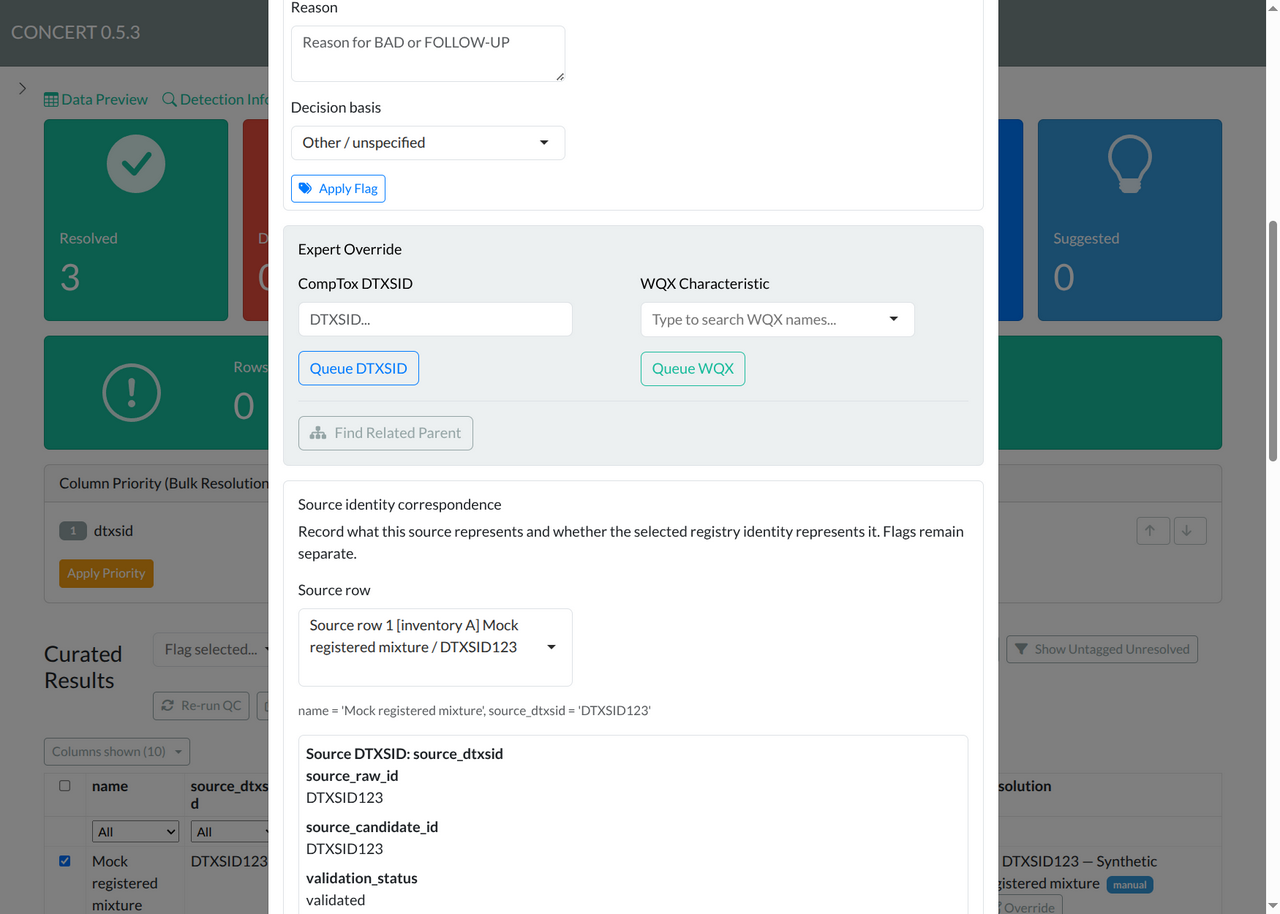
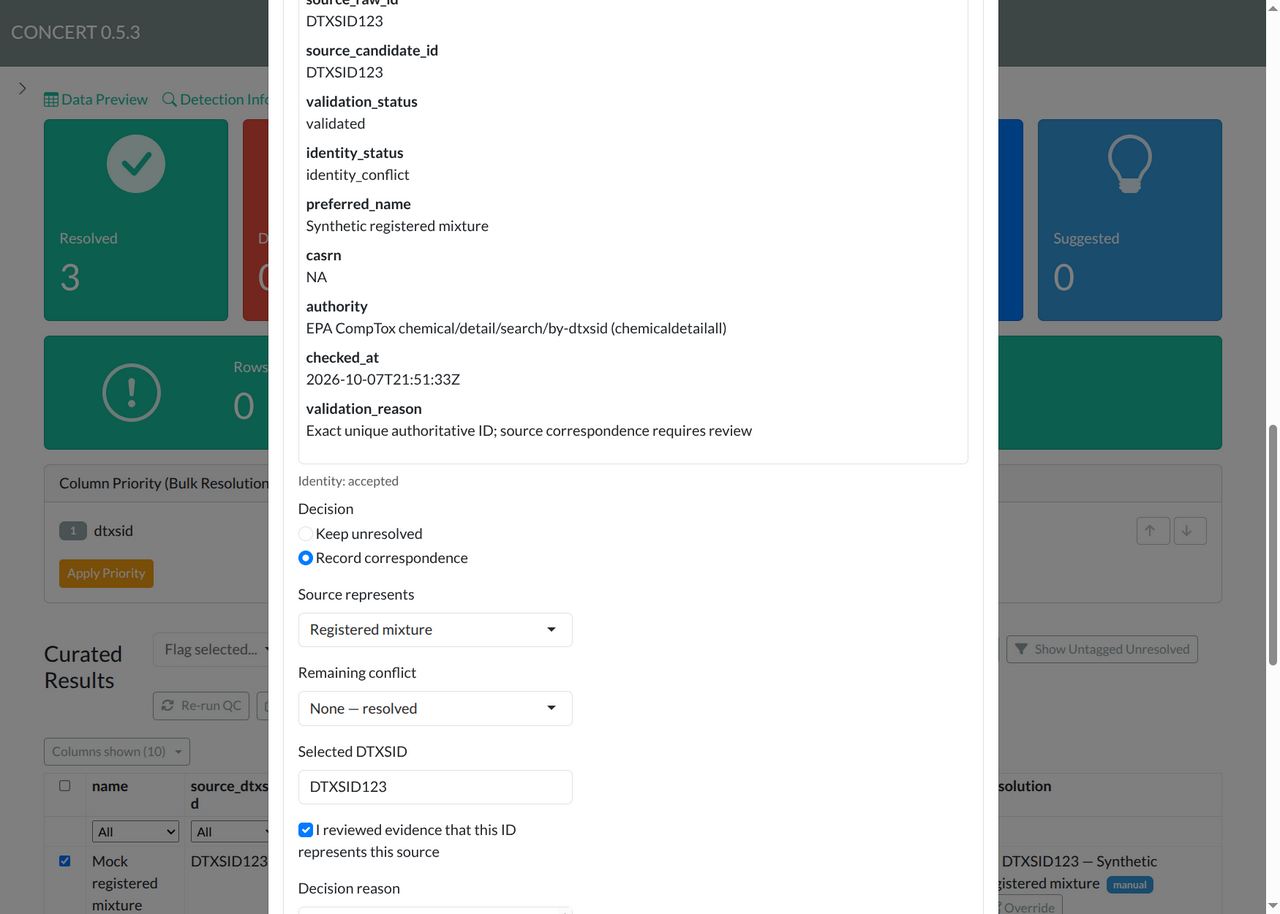
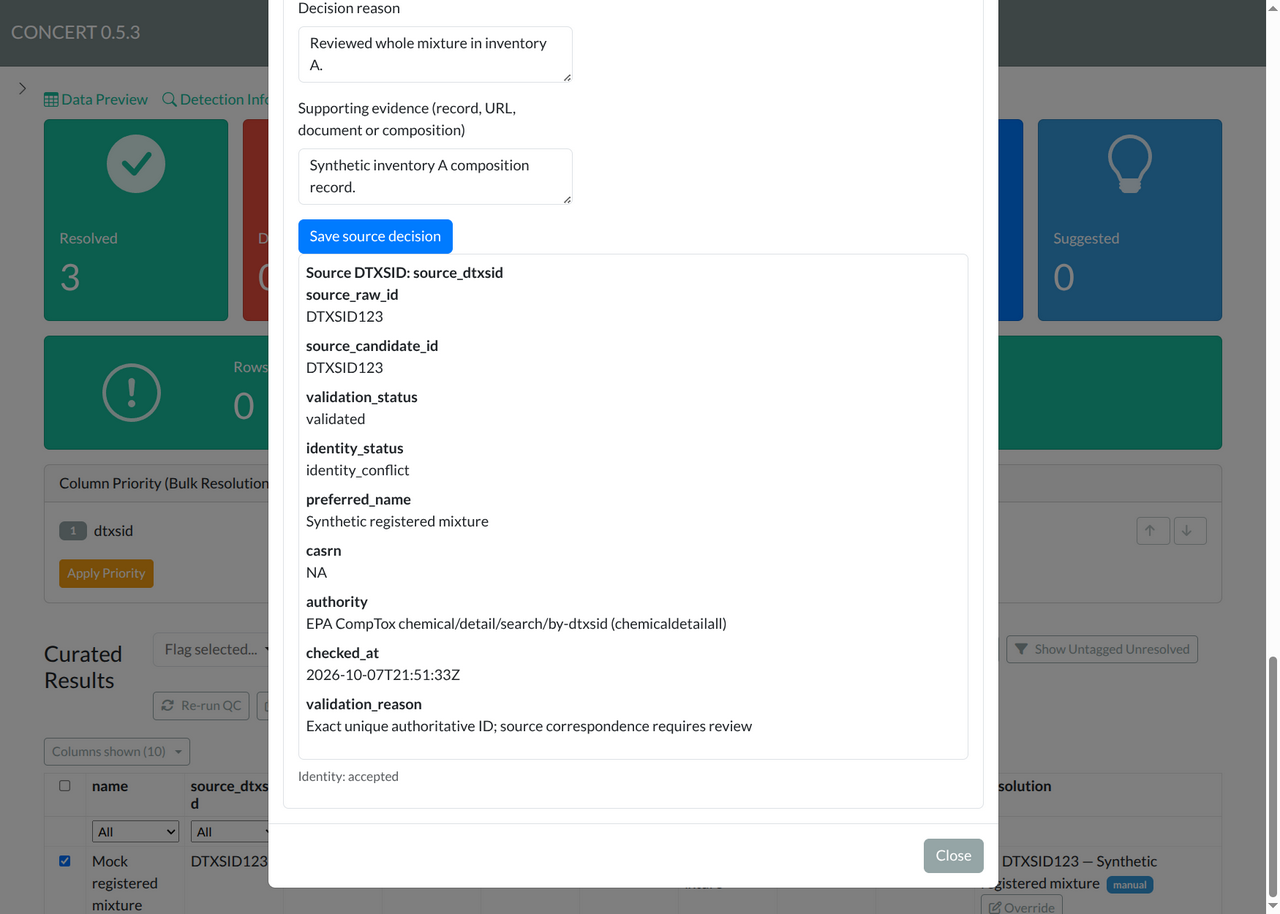
The dialog is long. These four overlapping screenshots cover it from
the title and source evidence through the flag controls, ordinary lookup
overrides, source selector, decision fields, result panel and
Close button. Scroll the dialog itself when using it on
a smaller screen. The current saved status shown above the form is
separate from the draft fields you are entering; reopening the dialog
does not prefill a new decision from your earlier one. Source evidence
may still show identity_conflict: it preserves the lookup
outcome. The separate Identity: accepted line reflects
the current explicit source decision; accepting it does not erase the
evidence you reviewed.
Top: source evidence and row flags.
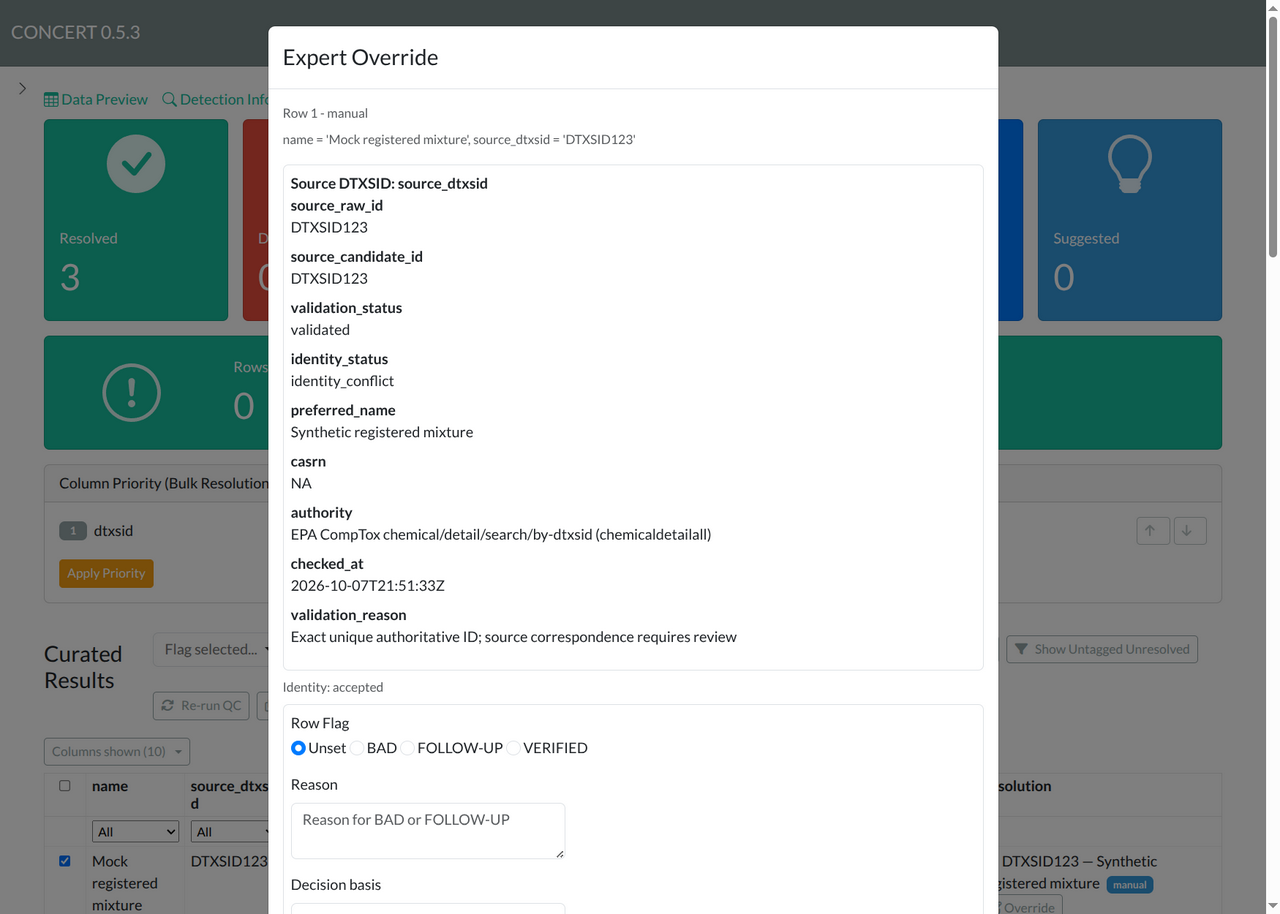
Next: ordinary override controls and the source selector.
Next: inspected evidence and the correspondence decision.
Bottom: reason, supporting evidence, Save, current result and Close.
Choose the scope of the action deliberately
A chemical-wide correction can be appropriate when the correction applies to all matching source entries. The ordinary override controls support that kind of correction. Source identity correspondence records the narrower decision that the selected ID represents one source entry. It does not propagate that decision to another inventory just because its chemical name matches. The same source scope is preserved when you re-run curation.
Flags are separate from correspondence. Saving a source decision preserves FOLLOW-UP, BAD, VERIFIED and their reasons. FOLLOW-UP remains pending; BAD remains excluded from accepted identity. VERIFIED with unresolved current identity still requires review. Finishing the review queue, reconciling a saved decision with current evidence, and accepting an identity are different outcomes.
Save, restore and replay
Download Excel saves source values, lineage,
decisions, review evidence and applied cleaning choices. The
Accepted Identities sheet reports the accepted view;
the ordinary Curated Data sheet also retains
provisional lookup evidence. Existing export defaults continue to use
their established lookup policy. Accepted-only ToxVal output is an
explicit headless option,
toxval_identity_mode = "accepted"; see Headless curation.
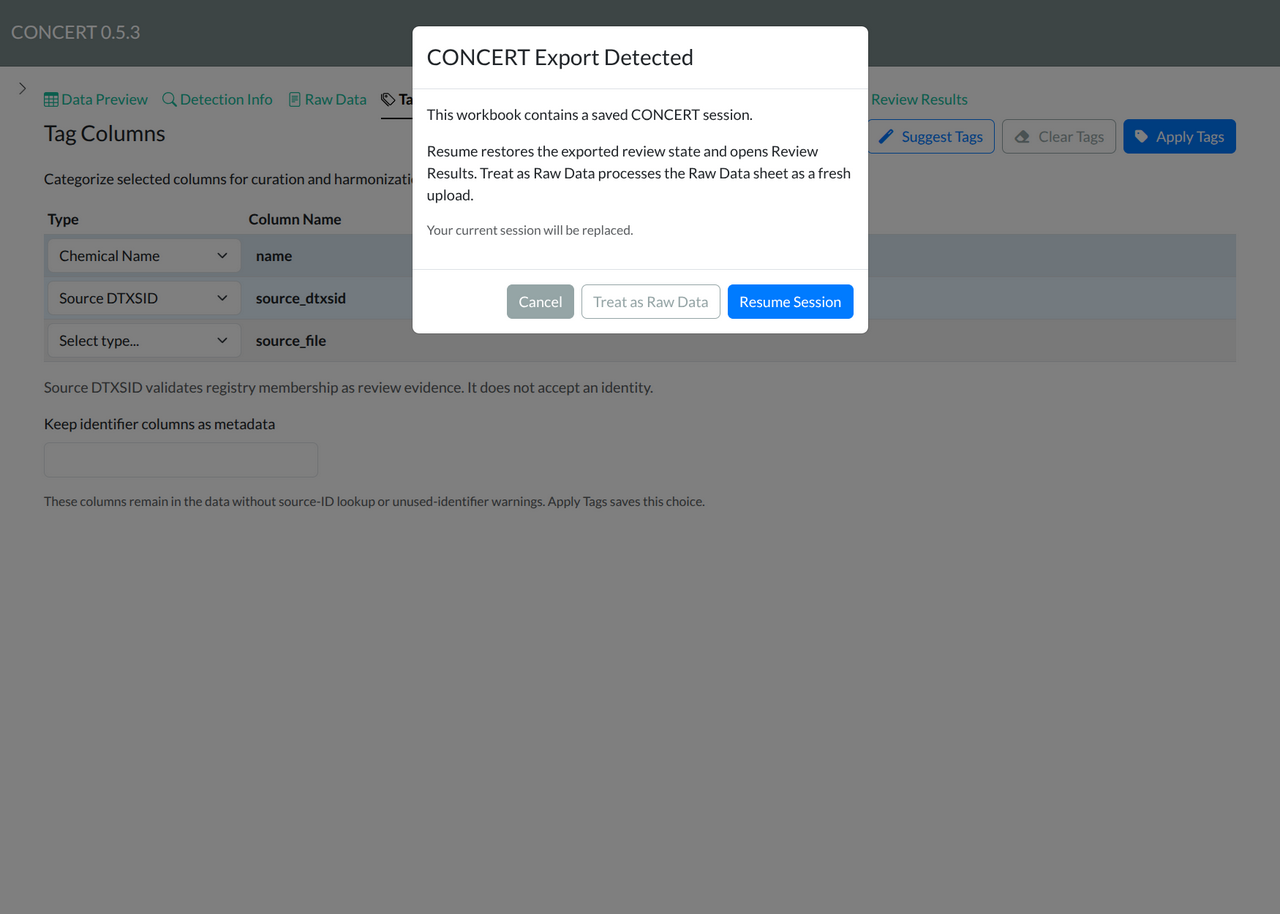
To resume the full review, upload the exported workbook through the regular file-upload control and choose Resume Session. Treat as Raw Data starts a new workflow from its Raw Data sheet. Import Configuration only restores selected configuration, such as tags and reference lists; it does not resume the complete review session.
Use Code to download the R replay script and run it against the original input file. Applied cleaning choices are included; skipped cleaning remains skipped. If a later lookup changes evidence, acceptance becomes stale, the history remains available, and the app asks you to review the current source again. An unchanged re-run preserves the source decision without broadening it to other entries.